How to shrink an image?
The Pillow library reads, writes and edits images.
It contains simple drawing tools and filters that can be applied to pixel based images. The most important feature of Pillow is that it can read and write almost all popular image formats.
Install it with:
pip install pillow
The following code shrinks every image in a folder to half its x/y size:
# Convert all `.png` images in the current working directory to half their size
from PIL import Image
import os

for filename in os.listdir('.'):
    if filename.endswith('.png'):
        im = Image.open(filename)
        x = im.size[0] // 2
        y = im.size[1] // 2
        small = im.resize((x, y), resample=Image.Resampling.LANCZOS)
        small.save('small_' + filename)
How to create an image from scratch?

# generate dice image

from PIL import Image, ImageDraw

five = Image.new('RGB', (64,64), '#80b940')
d = ImageDraw.Draw(five)

d.ellipse(((26, 26), (38, 38)), '#ffffff')
d.ellipse(((10, 10), (22, 22)), '#ffffff')
d.ellipse(((42, 42), (54, 54)), '#ffffff')
d.ellipse(((10, 42), (22, 54)), '#ffffff')
d.ellipse(((42, 10), (54, 22)), '#ffffff')
five.save('five.png')
How to mix color channels?
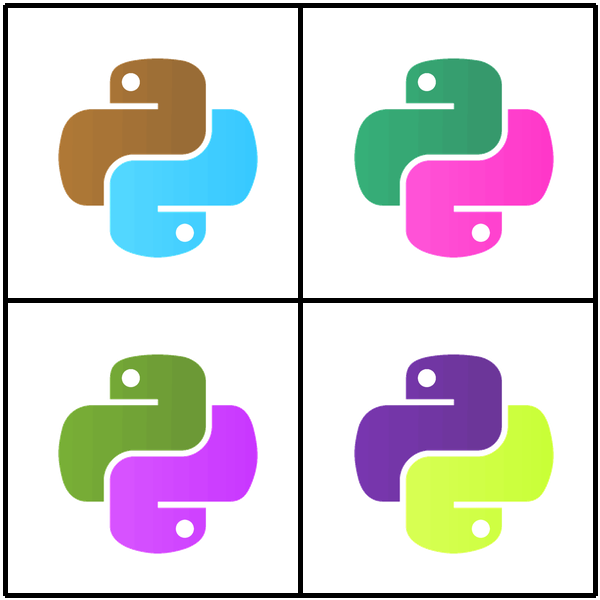
# example: create Andy-Warhol like images

from PIL import Image, ImageDraw

pylogo = Image.open("python_logo.png")
print(pylogo.size)

r, g, b, a = pylogo.split()

pylogo1 = Image.merge("RGB", (b, g, r))
pylogo2 = Image.merge("RGB", (r, b, g))
pylogo3 = Image.merge("RGB", (g, b, r))
pylogo4 = Image.merge("RGB", (g, r, b))

collage = Image.new("RGBA",(600,600), "#FFFFFF")

collage.paste(pylogo1,(58,58))
collage.paste(pylogo2,(354,58))
collage.paste(pylogo3,(58,354))
collage.paste(pylogo4,(354,354))

draw_tool = ImageDraw.Draw(collage)
draw_tool.line(((5, 5),(595, 5)), fill=(0,0,0),width=5)
draw_tool.line(((595, 5),(595, 595)), fill=(0,0,0),width=5)
draw_tool.line(((5, 5),(5, 595)), fill=(0,0,0),width=5)
draw_tool.line(((5, 595),(595, 595)), fill=(0,0,0),width=5)
draw_tool.line(((300, 5),(300, 595)), fill=(0,0,0),width=5)
draw_tool.line(((5, 300),(595, 300)), fill=(0,0,0),width=5)

collage.save('pylogo_warhol.png')
collage.show()
How to create turtle graphics?
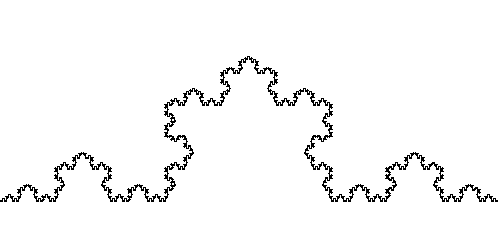
"""
Draw a Koch curve using turtle graphics.
"""

from PIL import Image, ImageDraw
import math


class Turtle:
    """
    Draws turtle graphics on a white background.

    The turtle has a position and a direction,
    and can move forward and turn left and right.
    """
    def __init__(self):
        """Initializes the turtle."""
        self.x = 0
        self.y = 200
        self.angle = 0.0
        self.image = Image.new('RGB', (500, 250), (255,255,255))
        self.draw_tool = ImageDraw.Draw(self.image)

    def turn_left(self,ang):
        self.angle -= ang
        if self.angle<0: self.angle += 360

    def turn_right(self,ang):
        self.angle += ang
        if self.angle>=360: self.angle -= 360

    def move_forward(self,length,draw=True):
        """
        Moves the turtle forward in its current direction.
        It draws a line (can be turned off optionally."""
        new_x = self.x + length * math.cos(math.radians(self.angle))
        new_y = self.y + length * math.sin(math.radians(self.angle))
        self.draw_tool.line(((self.x,self.y),(new_x,new_y)), fill=(0,0,0),width=2)
        self.x = new_x
        self.y = new_y


def snowflake(turtle, length, depth):
    """Draws a recursive snowflake curve with the given turtle."""
    if depth == 0:
        turtle.move_forward(length)
    else:
        snowflake(turtle, length * 0.333, depth-1)
        turtle.turn_left(60)
        snowflake(turtle, length * 0.333, depth-1)
        turtle.turn_right(120)
        snowflake(turtle, length * 0.333, depth-1)
        turtle.turn_left(60)
        snowflake(turtle, length * 0.333, depth-1)


if __name__ == '__main__':
    # try different values for 'depth'
    t = Turtle()
    snowflake(t, 500, 1)
    t.image.save('snowflake1.png')
    t = Turtle()
    snowflake(t, 500, 2)
    t.image.save('snowflake2.png')
    t = Turtle()
    snowflake(t, 500, 5)
    t.image.save('snowflake3.png')
See also