Baby Names
In this chapter you will:
area |
topic |
|---|---|
🚀 |
analyze birth statistics |
💡 |
use the |
💡 |
use the |
🔀 |
parse comma-separated files |
🐞 |
fix FileNotFound errors |
The dataset of U.S. baby names

For this chapter, you will need to download a data set of baby names. The authorities of the United States have recorded the first names of all people born as U.S. citizens since 1880. The dataset is publicly available on www.ssa.gov/oact/babynames/limits.html.
Download the shorter archive of baby names (not grouped by states).
Note
For the protection of privacy only names used at least 5 times appear in the data.
Exercise 1: Read a file
Unzip the downloaded archive and place the folder next to your Python program.
Read one of the files by inserting line, line, open and
print into the gaps.
for ___ in ___(r"names/yob2022.txt"):
    if "Maria" in ___:
       ___(line)
Hint
Depending on your editor, you may need to insert the complete path to
the file insted of names/.
On Windows, the r is important to have Python correctly interpret
backslashes as separators.
Exercise 2: Distinct names
How many different girls names were there in 2022?
Sort the following code lines and indent them correctly:
girls = 0
if "B" in line:
print(girls)
if ",F," in line:
for line in open(r"names/yob2022.txt"):
girls += 1
Exercise 3
Extend the program from the previous exercise such that boys and girls names are counted separately.
Exercise 4: Frequent names
The following program collects names in a list that occur at least 10000 times. Unfortunately, the program contains four errors. Find and fix these.
frequent = []

for line in open(r"names/yob2022.txt"):
    columns = line.strip().split(",")
    name = colums[1]
    if int(columns[3]) >= 10000
        frequent.append(name)

print(frequent)
Exercise 5: Total babies
Write a program that calculates the total number of babies for the year 2022 and writes it to the screen. Compare that number with the year 1922.
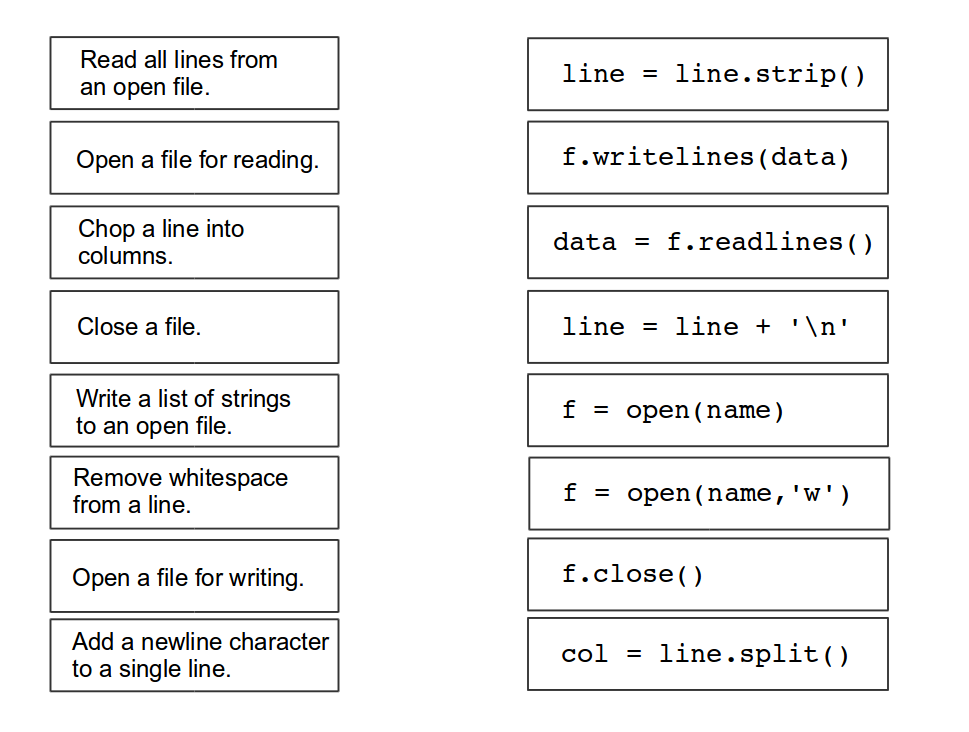
Exercise 6: Read and write
Form pairs of Python commands and their meanings.
Exercise 7: Write a file
Execute the following program. Explain what happens.
names = ["Ada", "Bob", "Charlie", "Dorothy"]

with open(r"names.txt", "w") as f:
   for name in names:
       f.write(name + "\n")
Hint
What happens if you remove the \n from the program?
Exercise 8: f-Strings
Try the following commands in a Python shell:
name = "Ada"
number = 42
pi = 3.14159

print(f"{name}")
print(f"{name:>10}")
print(f"{number:5d}")
print(f"{number:05d}")
print(f"{pi:4.1f}")
print(f"{pi:6.3f}")
print(f"name: {name}    number: {number}    pi: {pi:6.3f}")
Exercise 9: Directories
To process bigger amounts of data, you will need to work on more than
one file. Sometimes you don’t know all the files in advance.
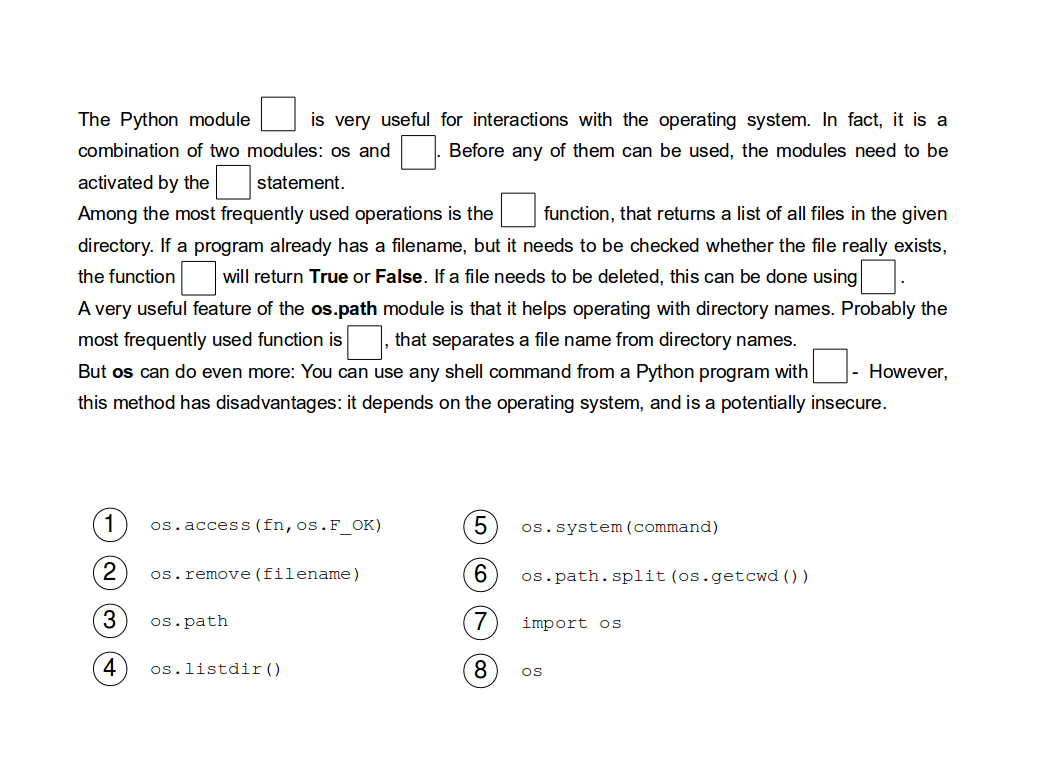
The os module is quite useful for working with many files and directories.
Fill in the gaps:
Exercise 10
Explain the following code:
import os

for dirname in os.listdir(r"names/"):
    print(dirname)
Recap: Read and write text files
Insert working code into the blanks:
# 1. Create a list with the numbers 1..7
...

# 2. Convert the numbers to a string
...

# 3. Open a file for writing
...

# 4. Write the numbers to the file
...

# 5. Open the file for reading
...

# 6. Read all numbers in a list
...

# 7. Sum up the numbers
...
Reflection Questions
How do you know that a file path in a program is wrong?
What do you need to check if a file path in a program is wrong?
How to print all file names in a folder?