Inspect DataFrames

Captain’s Inspection
Aarla went for a round of inspection through the ship. She always did before departing on a journey. It was a captains responsibility to make sure every room was in order. Also, there should be some tasty fish soup in the fridge! ...
The ships computer has prepared a tabular report already. All you need to do is to see what is in the table.
Fasten your seat belts and load the report stations.csv into a DataFrame and check the following commands.
What is a DataFrame?
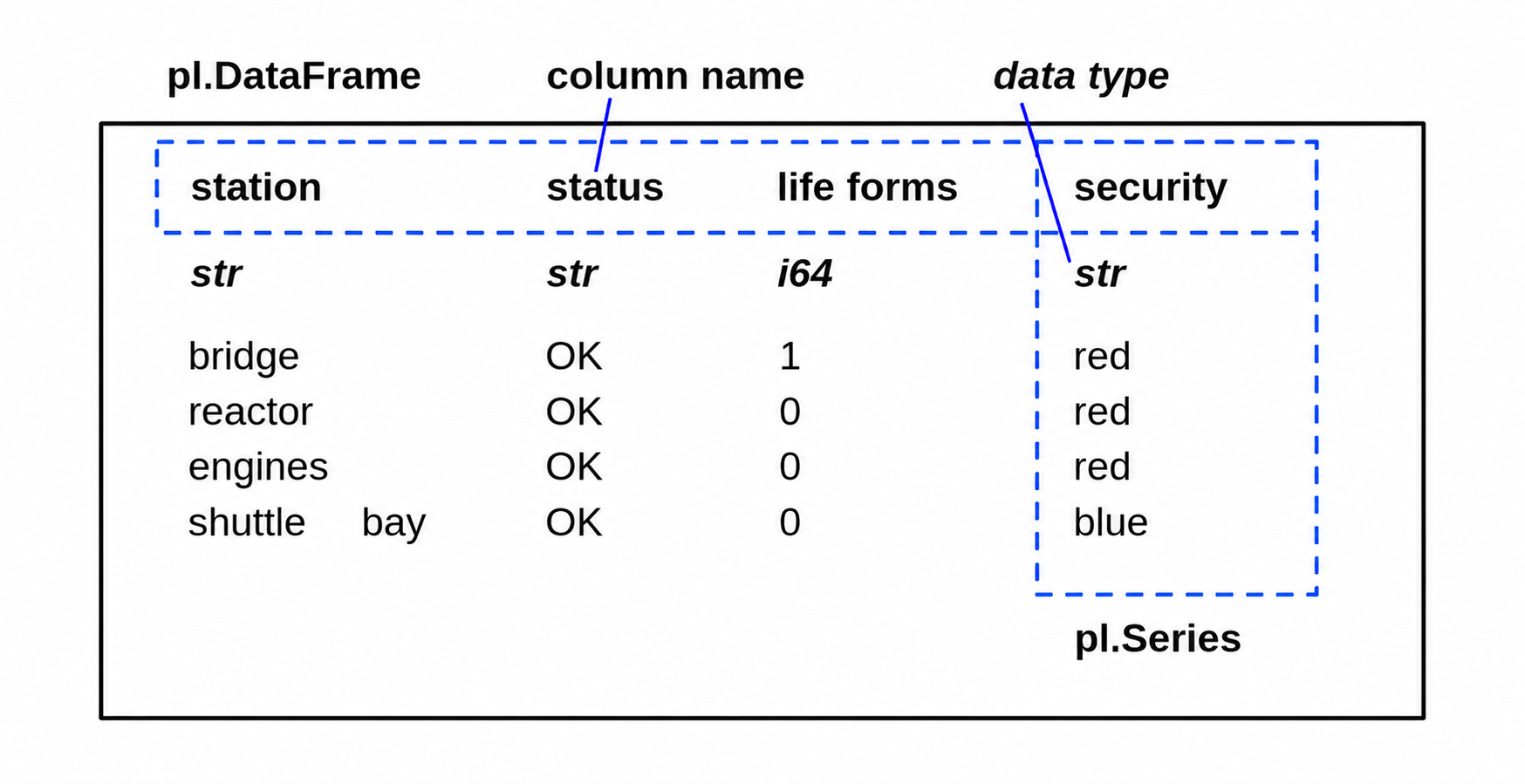
The class polars.DataFrame is the central data structure in polars. You can think of it as a table of data, with columns (each of a specific type) and rows. Unlike pandas, Polars does not have an implicit index; all data is stored in columns, and if you want an “index,” you create it explicitly. Each column is a polars.Series. Polars is designed for high-performance and parallel computation, making it especially fast on large datasets.
Inspect a few rows
You might want to see a few rows. In Jupyter, you can do that by typing the variable name in a cell. In a Python script, you could print(df). But you could use the more explicit methods head() and tail():
df.head(3)
df.tail(3)
Can I call head() and tail() without a number?
Yes. The default number if you leave away the argument is 5.
Number of rows and columns
The shape of a DataFrame is alway a tuple of two integers (rows, columns).
df.shape
When do I need to check df.shape?
df.shape is your most important command when debugging. If the shape is not what you expect, everything is wrong.
Data types
When you load data from a CSV file, polars automatically infers data types. Sometimes a single wrong value converts a numerical column to strings.
df.dtypes
What does the data type i64 mean?
The type i64 refers to an integer with 64 bit precision. It is able to cover numbers from -9223372036854775808 to 9223372036854775807. Floating point numbers also have a precision in bits.
Generic overview
Polars prints the table by default with data types, so often df is already enough for a quick overview:
df
You can check data types and the number of entries for each column:
df.glimpse()
How to check the memory size of a DataFrame?
The df.estimated_size() method returns the approximate memory usage of the DataFrame. By default size is shown in bytes. Specify 'mb' to display the result in megabytes
Unique values
With categorical columns, you might want to know, what are the most frequent values or what different values occur. This also helps you to identify some data errors.
df['column_name'].value_counts()
If you are not interested in the count, check the unique values:
df['column_name'].unique()
Attributes and methods of DataFrames
command |
description |
|---|---|
|
number of rows and columns |
|
number of rows |
|
number of columns |
|
shows data types |
|
shows first n lines |
|
shows last n lines |
|
quick summary |
|
counts unique values in a column |
|
shows unique values in a colunmn |
|
returns size in bytes |
|
returns number of memory chunks |
Challenge
Inspect the report stations.csv. Solve the following tasks
display the number of rows and columns
display the last 5 rows
list the column names
how many stations does the ship have?
how many different security levels are there?
which of the stations is under construction?
where did Ming Ming, the intern, go?