Select Rows and Columns
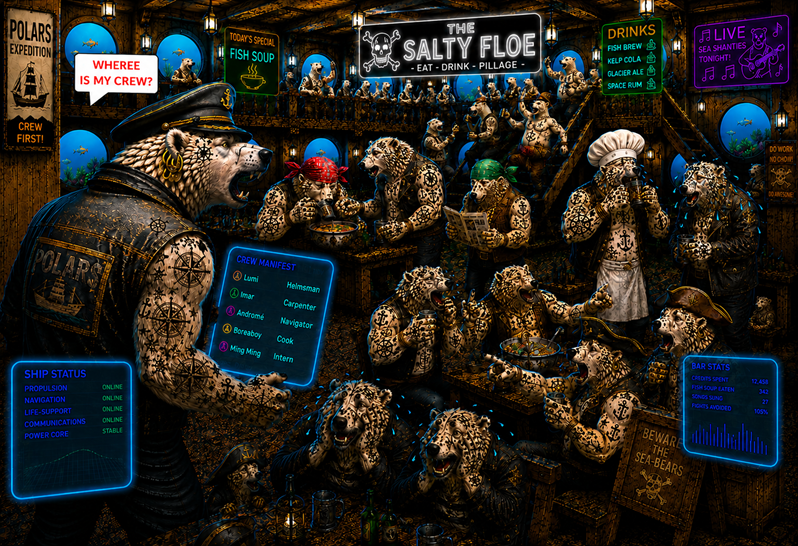
Find your Crew
"Time to leave", Captain Aarla thought. "Wait, the ship is completely empty. Where is everybody? Grm! of course they are hanging out at the bar." Aarla slammed the bar door open. The bar was full of people. Aarla yelled: "WHERE IS MY CREW?". The room fell silent immediately. A few bears ducked behind a corner or jumped below a table. But for sure her crew was here. She went around looking.
To recognize your crew members again, you’ll need to load the bar registry bar.csv using Polars and inspect the data.
Show column names
You may want to access column names as a Python list. This is also useful to check what types the names are.
df.columns
Select a column
A single column is returned as a pl.Series:
df['id']
Select multiple columns
Multiple columns require double square brackets. The inner one is a list of column names:
df[['black_spots', 'blue_spots']]
Select rows by position
The slice() method selects rows by position.
The first argument specifies the starting row, and the second argument specifies the number of rows to return.
df.slice(5, 10)
Select columns by position
The column slice df.columns[1:4] selects columns 2–4, which are then returned using select().
df.select(df.columns[1:4])
Select rows and columns by position
Combine both row and column selection:
df.slice(5, 10).select(df.columns[1:4])
A pythonic index notation is also available. The first pair in the square brackets selects rows 2-5, the second pair selects columns 3 to 4. Note that indices in Python always start at zero, and the last position is never included.
df[5:15, 1:4]
Note
In this tutorial, we are giving preference to the functional notation using
functions like slice because it integrates more easily with other tools.
Select rows by column value
To select rows based on column values, use the filter() method.
This is useful for selecting rows where a column matches a specific value, e.g.
df.filter(pl.col('ears') == 'pink')
Filter by value
This is very powerful selection logic that is applied to all rows simultaneously.
The notation with double square brackets looks a bit weird first. It is easier to understand if you know the inner expression results in a boolean mask that is used to filter the rows of the DataFrame.
df.filter(pl.col('ears') == 'pink'))

df.filter(pl.col('black_spots') < 3)

df.filter(pl.col('black_spots').is_between(3, 7))

df.filter((pl.col('black_spots') < 3) & (pl.col('blue_spots') > 7))
Note that you have to use the binary operators &, | to combine multiple conditions. The logical operators and, or will not work.
Select random rows
df.sample(7)
Selecting and filtering examples
command |
description |
|---|---|
|
select the first row as a tuple of values |
|
select all rows, skipping the first 10 |
|
select 10 rows starting from row 6 |
|
select all columns except 'id' |
|
select all columns explicitly |
|
select columns by data type |
|
find rows where 'ears' is exactly 'pink' |
|
find rows where 'ears' is neither 'pink' nor 'black' |
Challenge
Select rows from the bar registry bar.csv to find your five crew members.
You have a couple of hints:
Lumi (the helmsman) is easily recognizable by his red headscarf.
Ilmar (the ships carpenter) has at exactly 24 tattoos and a headscarf that is blue or indigo.
Andromé (navigator) has a green headscarf and more earrings than Boreaboy.
Boreaboy (cook) has exactly between 8 and 11 earrings and less than 5 tattoos. He has no headscarf.
Ming Ming, the intern from the remote planet of Pandalor has no tattoos, earrings or scarf
Identify all five of them by their id.
What is the sum of your crew members id values?
It should be exactly 321.
How was the crew data generated?
Below you find the code to generate the data in crew.csv:
The generator uses np.random.seed(42), so it is deterministic and reproduces the same file content.
import polars as pl
import numpy as np

np.random.seed(42)
N = 100
HEADSCARF = ['black', 'white', 'pink', 'blue', 'green', 'orange', 'indigo', None] * 6 + ['red']

index = pl.Series("id", np.arange(N))

df = pl.DataFrame(
    {
        "id": np.arange(N),
        "headscarf": np.random.choice(HEADSCARF, size=N),
        "earrings": np.roll(np.random.randint(0, 12, size=N), -1),
        "tattoos": np.random.randint(0, 25, size=N),
    }
)

df.write_csv("bar.csv")