Dot Voting
Which topics in a course should be revisited, repeated, or explained in more depth? Dot Voting lets large groups choose from up to 50 possible options within minutes.
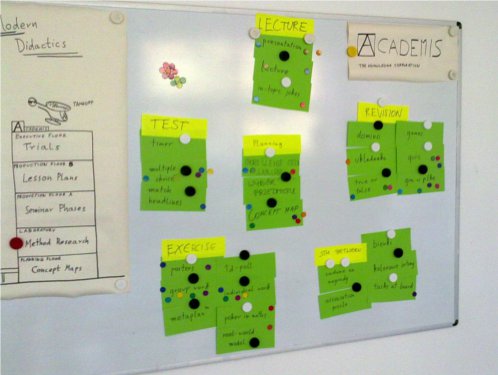
summary |
put sticky dots on topics |
|---|---|
time |
10’ |
preparation |
10’ |
group size |
up to 16000 (seen on the 34c3 conference) |
material |
paper, lots of sticky dots |
How to do it
Visualize all available topics on paper.
Explain the task, e.g. “Stick dots on topics we should repeat tomorrow.”
Distribute 3-5 sticky dots to each participant.
Students stick on their dots by themselves.
The dot voting procedure works with flipchart paper, cards on a pin board or even post-its. On a big pin wall, you can vote on 50 items simultaneously. You are not restricted to sticky dots. Magnets and even making crosses with pens works well.
Sticky dots or pins make the voting more interactive. The beauty of this method is that, in contrast to a poll with raising hands you give your participants time to think. Also there is a haptic component - you put responsibility literally into the hands of your participants.
Variation: Target Feedback
Draw a target (concentric circles) with four quadrants
Label the quadrants “Atmosphere, Content, Method, Trainer, Usefulness, etc.”
Hand out sticky dots to participants or pens
Partimants mark one dot per quadrant
Don’t stare at the participants while they place their dots
Acknowledgement: Marcus Koch
Comments
Dot voting is frequently used on Unconferences, where it scales up to 100+ participants.
During the RuPy conference, I used poker chips to collect instant feedback on the talks. We put up differently labeled boxes near the exit.
Also see: www.gamestorming.com/core-games/dot-voting/.